Running Qwen3.8-27b with maximum context on an RTX5090
Running Qwen 3.8 27b on a single RTX 5090
First off… It’s all about value
Anyone who knows me knows that I have always believed in maximizing value. I don’t pay premiums because they are “branded”. While companies like OpenAI and Anthropic have made incredible contributions in the world of AI, I don’t believe in paying for that shit. The gap beween the open-weighted models and the closed sourced stuff is the smallest it has ever been, and I don’t see why you should be paying more without getting “more”. I couldn’t give a shit if it’s American or Chinese. If the dollar to value ratio is good, I’ll take it. This goes the same for almost everything I buy.
I’ve gone through many ways of trying to get maximum value out of minimal cost over the past year. From Chutes, to the Alibaba Coding Plan, to now Opencode Go. They were glorious. For 10 bucks you get access to frontier Chinese models.
The now sunsetted Alibaba Coding Plan Lite was godlike, giving you up to 18000 API calls a month. Yes, API calls. If you run a 1m context model and truly use up the full context in a single prompt, it is ONE API call. Context management wasn’t a concern; your first prompt that said “hi” costed the same as the prompt at the end of a multi day coding session. They probably realized it was a bad idea so that plan didn’t last long.
In any case, as time went by, models got more expensive. Kimi K3 started to cost $15/1m output tokens, which is the highest I’ve seen a Chinese model go.(Still cheaper than the now ancient Opus 4.5 which still costs $25/1m lol.).
Deepseek, the champion of value also increased their pricing. Their V4 Flash and V4 Pro used to cost $0.28 and $0.87 respectively per million output tokens, while trading blows with some of the previous gen frontier models.
But look at this now:
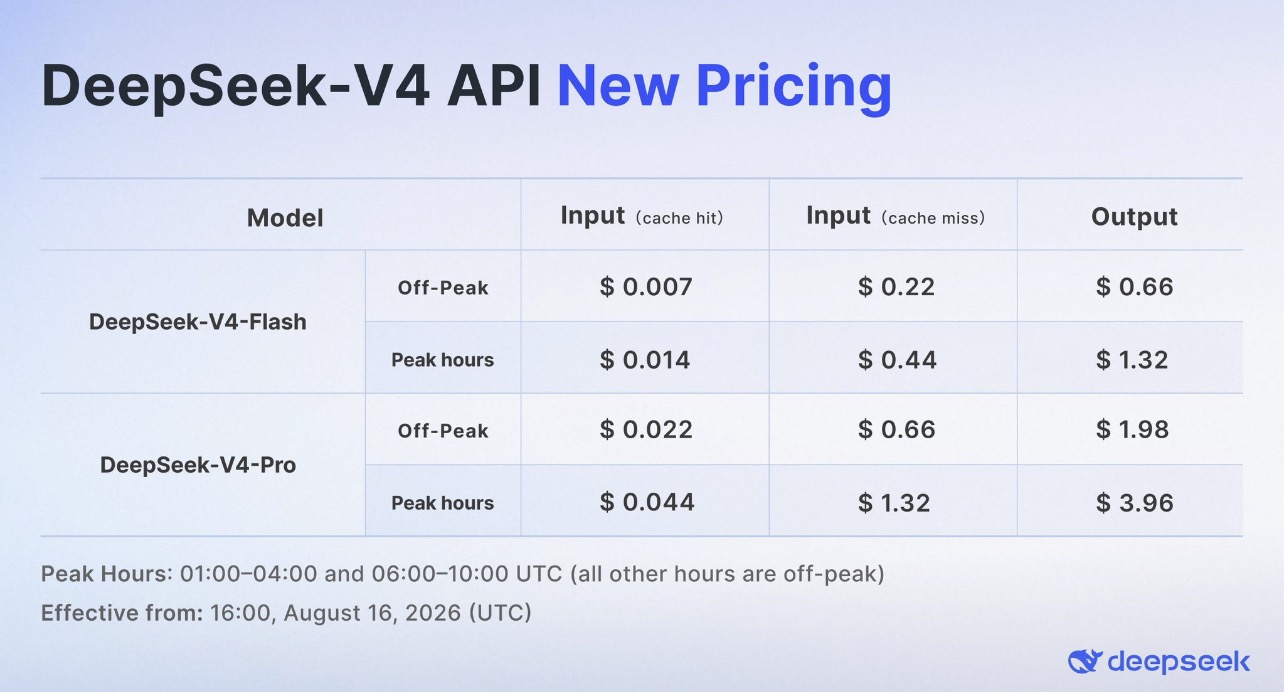
Still cheap, performs insanely good. but I have other ideas.
Identifying requirements
When you look at coding with AI, you first need to understand what are your needs and wants.
Say it with me:
Not everyone needs the latest Opus, Fable, Sol, Kimi K3, GLM 5.3, or Qwen3.8-Max
With good prompting, many mid-tier(or even small 8b parameter count models) can probably get the job done for most people. Small models write my code just fine for the most part personally. I like using the newer beast multi-trillion parameter models for troubleshooting and orchestration. If you’re doing complicated stuff or are working with large codebases sure, you might need the larger models, which usually have large(1mil) contexts supported. But not everyone does.
This brings me to my next point. Orchestrators. This is how you can reduce reliance of the frontier-tier models.
Initially, I used Opencode’s Plan and Build mode to switch models. I would run a “smarter” model with Plan with Read-Only access to my code, and refine the scope of work that needs to be done. Use this, modify that, create a function with this exact capability, yada yada. When the plan looked solid to me, I switch to a cheaper model to execute on the plans.
With this way of doing things, my requirements change. I don’t need a crap ton of tokens for a frontier model. I need some for it, and then a crap ton for a much cheaper one.
Eventually, I moved over to Oh My Opencode Slim. This opencode plugin allows me to select a main “Orchestrator” model, which can spin off subagents with different models for types of subtasks.
Now this style of coding allowed for some interesting ways of doing things. Models with good thinking and reasoning capabilities like Kimi-K3 could be the orchestrator, while I could run Deeps… no, a local model to do the coding stuff.
Yes. A local model.
The open weights for Qwen 3.8 were just released last week and I was extremely keep to get my hands on it. Benchmarks never tell the full story, but it’s a good starting point if you want to gauge a model. A 27b model that fits on consumer hardware. It supposedly can match Opus 4.6 on certain benchmarks, which makes it really interesting to me.
Remember what we said earlier. I don’t need a frontier model to write me a couple thousand lines of fairly uncomplicated code. Smaller ones work just fine. I decided this will be the one I will use to drive my costs down.
Now I’m an avid gamer, running a desktop with an NVIDIA RTX 5090. This particular card has 32gb VRAM, which should be able to run this model comfortably, and at a reasonably fast speed.
There are stuff all over the internet now on running this on “low vram” graphics cards. Stuff like [here][7] and here. “Run Qwen 27b within 32gb VRAM on a 5090” they say. Good stuff.
But at what cost?
Model Quantization
Models are not particularly small. So models get quantized. A Q4 model is about half the size of a Q8. A Q6 would be somewhere in between. But this is just a broad generalization. I won’t go into Q vs FP vs IQ or NVFP4, let’s just focus on the number suffix. 4-bit, 6-bit, 8-bit. You get the idea.
More aggressive quantization. As they get smaller, it can usually lead to some accuracy loss and degraded reasoning.
The original Qwen3.8-27b model released is 56gb in size. It’s not going to fit in our little gaming graphics cards, so we absolutely will need a quantized model. Unsloth is one of the more reputable sources of quantized models in this. On their huggingface you can see a ton of quants available.
The BF16 is ~56gb, the Q8 is 30GB, the Q5 is around 21gb, and the 4-bit stuff is closer to 16-17gb. While these are not an exact representation of how much VRAM they will require, it gives a modest initial gauge for us.
So should I just run a Q8 since I have 32gb VRAM on my Graphics Card? Not so fast.
KV Cache
When you serve a model, regardless ofllama.cpp, vLLM, SGLang or whatever is recommended nowadays, it also allocates space in your VRAM for your context. This is the KV(Key-Value) Cache. Oversimplified, is the active memory of your conversation. You want longer context, you need more KV cache.
Now this is what they don’t tell you
So to fit your model into whatever your VRAM constraints a typical consumer gaming GPU has, you have to use a potentially heavily quantized model and accept some downsides, AND also suck it up and shrink the size of your KV cache.
Now Qwen3.8-27b natively supports a maximum 262144 context length. In a typical stateless chat setup, each request includes the relevant conversation hsitory as part of the input context. Coding agents can balloon this context quickly because things like file contents it has read, tool outputs, and previous reasoning can be come part of that context.
If you have a 500 line file containing code and the model has read it at some point, those tokens may potentially become part of your context, even if you don’t see it in your UI.
Can I run Qwen on an entry level 8GB VRAM GPU? Sure, in theory you can squeeze 1-bit variants of Qwen3.8-27b (7+gb) into a 8GB GPU, but you would have left almost no room for runtime overhead and KV cache. It could run, but you might be quite limited in how much you can do with it.
My Limits
Now I’ve tried quite a few “Recipes” and inference engines on the internet, vLLM? SGLang? Yeah been there done that.
That stuff didn’t quite work. I had issues with CUDA and Torch version mismatch, OOM, segmentation faults and a whole lot of other shit as I ran it in WSL. After over a week of troubleshooting,
I gave up. I’m not patient enough to get a working version going with the maximum context possible with vLLM or SGLang.
In the recipes I found, ``–gpu-memory-utilization 0.97` was commonly used to squeeze the configuration into a 32GB card. In my testing, getting close to the full 262k context required running the GPU right up against its memory limit.
Do I really need 262144 context? Potentially not, but self satisfaction knowing I did it is good for mental health. Self validation ya know?
How I eventually fixed it
I’ve been playing with the new Unsloth Desktop for Windows. It was a new shiny toy to me, seeming like a GUI with Unsloth Studio under the hood. And under that, it seems to run llama-server in llama.cpp. In windows, so far I’ve used Ollama and LM studio for comparison.
As it turns out, having a GUI does help knowing what options are available to you. It may not show everything, but it’s easier than going the RTFM route and figuring everything out.
When you load and serve the model(locally serving models is a preview feature they only just released at hte time of this post), it automatically fills in the context size for you, warning you about offloading if you exceed the available VRAM.
That was great, I could click stuff and move sliders around, reload the model, and find out the exact parameters I need to get the full 262144.
If anyone reading this runs windows and want to get it working on Windows, here is it!
Leave everything default except the following:
| Setting | Setting | Comment |
|---|---|---|
| Model | unsloth/Qwen3.8-27B-GGUF, UD_Q4_K_M variant. |
The 17gb variant |
| Speculative decoding | Off |
Take a bit of speed loss by disabling MTP(Multi Token Processing). 5090 is no slouch to be honest |
| Vision | Off |
If you need vision just turn it on for that single prompt or something and run lower context |
| KV Cache DType | Q4_0 |
This is important as it reduces KV VRAM allocation requirements significantly |
| Parallel Slots | 1 |
|
| Batch Size | 2 |
This is the minimum possible in Unsloth Desktop. |
| Other startup params | --use-eager |
Optional This disables nvidia CUDA graphs, which again reduces VRAM allocation at the cost of speed. |
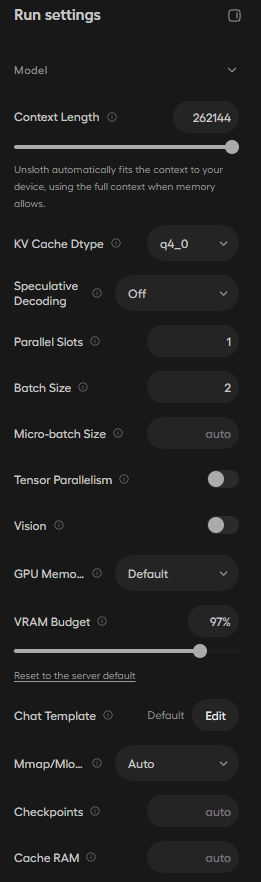
And in opencode.json, add the following(edit where required):
    "unsloth-studio": {
      "npm": "@ai-sdk/openai-compatible",
      "name": "Unsloth-Local",
      "options": {
        "baseURL": "http://69.420.6.7:8888/v1/",
        "apiKey": "thisisanapikey"
      },
      "models": {
        "unsloth/Qwen3.8-27B-GGUF": {
              "name": "Qwen-3.8-27b",
              "contextWindow": 262144,
              "modalities": {
                "input": [
                  "text",
                  "image"
                ],
                "output": [
                  "text"
                ]
              },
              "options": {
                "thinking": {
                  "type": "enabled"
                }
              },
              "limit": {
                "context": 262144,
                "output": 131072
              },
              "variants": {
                "none": {
                  "reasoningEffort": "none"
                },
                "low": {
                  "reasoningEffort": "low",
                  "reasoning_budget_tokens": 512
                },
                "medium": {
                  "reasoningEffort": "medium",
                  "reasoning_budget_tokens": 2048
                },
                "xhigh": {
                  "reasoningEffort": "xhigh",
                  "reasoning_budget_tokens": 8192
                },
                "xhigh-no-preserve": {
                  "reasoningEffort": "xhigh",
                  "reasoning_budget_tokens": 8192,
                  "chat_template_kwargs": {
                    "preserve_thinking": false
                  }
                }
              }

            }
          }
    },
p.s. I ripped the above from somewhere, it works but additional tweaking may be needed. Also, Qwen3.8-27b might have a custom chat template; I’ll update here if I do see it and if I think it’s neccessary.
Thanks for reading!
Kbye,
J